Spin-List Control – Primary Subtheme
Description
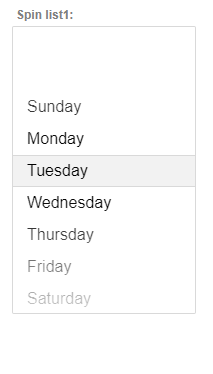
A new Primary subtheme is available for the Alpha style (and all styles inherited from Alpha). This subtheme improves visibility of the current selection in a Spin-List control by showing a shaded background behind the selected item.
Discussion
The Primary subtheme can be applied to any Spin-List when the UX component’s style is Alpha (or a style that inherits from Alpha). Once applied, the currently selected value in the Spin-List is highlighted with a subtle shaded background, making it easier for users to see which option is active.
Enable the Primary Subtheme
Open the UX Component and add (or select) a Spin-List control.
Ensure the UX style is set to Alpha (or a style that inherits from Alpha).
In the Spin-List properties, set the Sub-theme to Primary.
Notes
The Primary subtheme is only available when using the Alpha style or a style that inherits from it.